Commodore 1581
Gallery
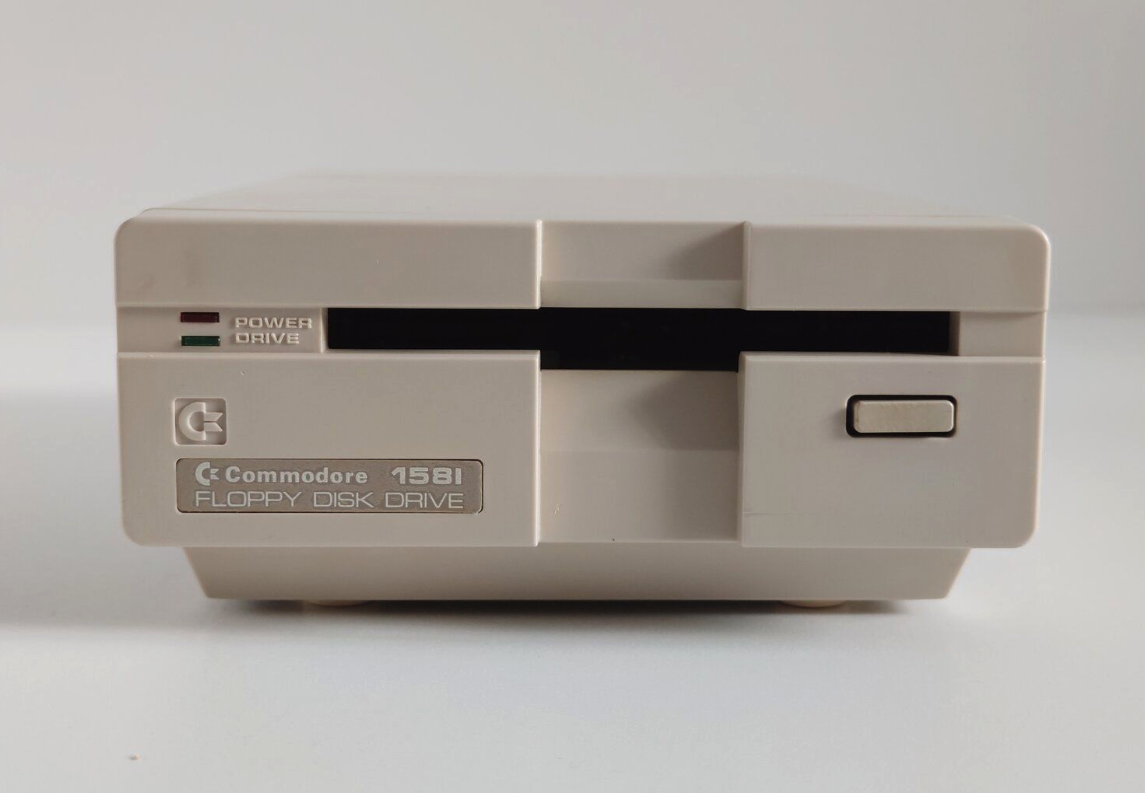
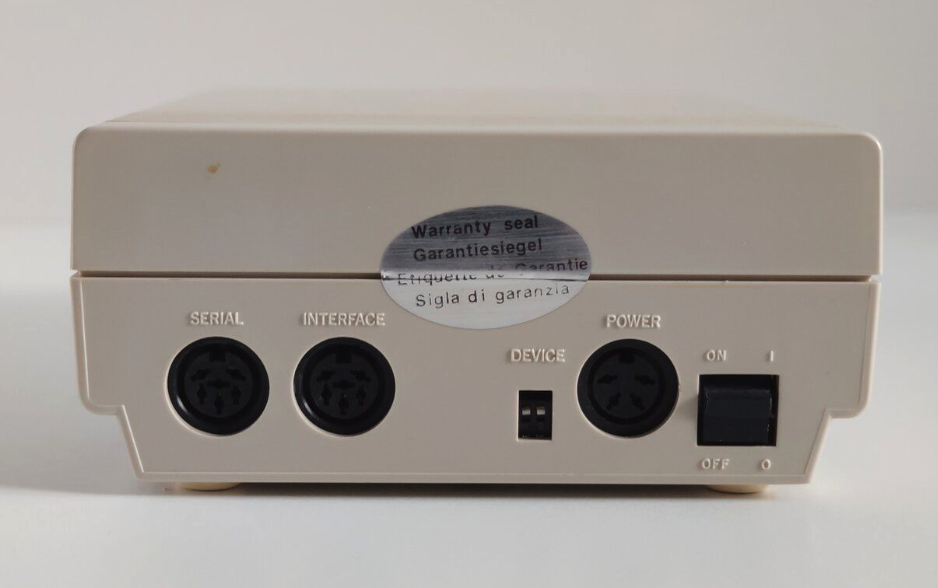
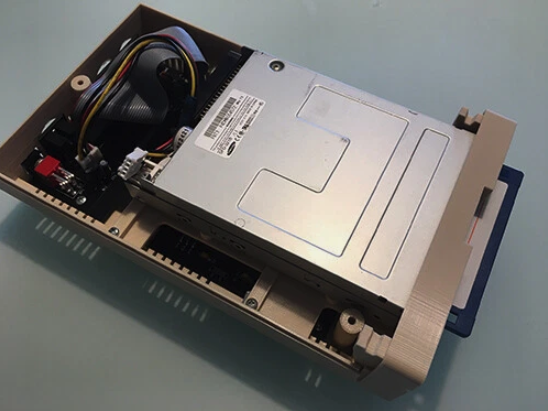
Commodore 1581 Floppy Drive
“The 1581 was our answer to the growing need for more storage in the 8-bit line. By moving to the 3.5” format, we were able to offer 800KB of storage in a more reliable package than the older 5.25” disks. The 1581 was particularly popular with BBS operators and serious users who needed more space for their applications and data. Its compatibility with both the C64 and C128, along with its improved reliability, made it a favorite among power users.” - Bil Herd, Commodore Engineer
The Commodore 1581 was a 3.5” floppy disk drive released by Commodore in 1987. It was designed to provide significantly more storage capacity (800KB) than the 5.25” drives that were common at the time. The 1581 used double-sided, double-density (DS/DD) 3.5” disks and was compatible with both the Commodore 64 and Commodore 128. Its introduction addressed the growing need for more storage space, especially for business applications, desktop publishing, and bulletin board systems (BBS).
Technical Specifications
Technical Specifications
- CPU
- MOS 6502A @ 1 MHz
- Memory
- 2 KB RAM, 32 KB ROM (16 KB ROM, 2 KB RAM)
- Storage
- Double-sided, double density, 800 KB per disk (80 tracks, 160 sectors per side)
- Dimensions
- 21.5 × 30 × 8.3 cm (8.5 × 11.8 × 3.3 in)
- Weight
- 2.3 kg (5.1 lb)
- Power
- 100-120V or 200-240V AC, 15W
Features and Capabilities
Hardware Design
- Drive Mechanism: 3.5” half-height mechanism (Mitsubishi or similar)
- Heads: Dual heads (one per side)
- Motor: 300 RPM spindle motor with direct drive
- Interface: Proprietary serial bus (IEC)
- Power Supply: Internal switching power supply
- Media: 3.5” double-sided, double-density (DS/DD) disks
Storage Format
- Capacity: 800 KB (formatted, 2×400 KB sides)
- Sectors per Track: 10-20 (variable)
- Tracks: 80 per side (160 total)
- Sectors per Disk: 3,200 (maximum)
- Sector Size: 256 bytes
- Transfer Rate: ~400 bytes/second
Performance
- Average Access Time: ~100ms
- Track-to-Track Seek Time: ~6ms
- Average Rotational Latency: 100ms
- Data Transfer Rate: 31,250 bps
- Bit Cell Time: ~32μs
Models and Variants
Original 1581 (1987-1990)
- Model Number: CBM 1581
- Features: Beige case, internal power supply
- Compatibility: C64, C128, Amiga (with adapter)
- Known Issues: Early firmware bugs (fixed in later ROMs)
1581-2 (1990-1994)
- Improvements: Updated firmware, improved reliability
- Changes: Minor internal revisions
- Compatibility: Same as original
Third-Party Clones
- Chipmunk: Popular clone with enhancements
- FD-2000: High-capacity alternative
- uIEC: Modern SD card-based alternative
Usage and Operation
Basic Commands
LOAD "*",8       : REM Load first program on disk
DLOAD"PROGRAM"   : REM Load with fast serial
SAVE"@0:FILENAME",8 : REM Save with overwrite protection
HEADER"DISKNAME",ID : REM Format disk
DOS"V"           : REM Validate disk
Disk Commands
- COPY: Copy files between disks
- RENAME: Rename files
- SCRATCH: Delete files
- VALIDATE: Rebuild BAM
- DUPLICATE: Copy disk with verification
- DIRECTORY: View disk contents
Common Error Messages
- ?FILE NOT FOUND: File doesn’t exist
- FILE EXISTS: File already exists
- ?DISK FULL: No more space on disk
- ?WRITE PROTECT ON: Disk is write-protected
- ?SYNTAX ERROR: Command error
Technical Details
File System
- File Types: PRG, SEQ, USR, REL, DEL
- Directory Structure: Hierarchical (subdirectories)
- File Header: 16 characters max
- Block Availability Map: Track 40, sector 0
- Directory: Track 40, sectors 1-8
- BAM: Tracks free/used sectors on both sides
Disk Format
- Sector Interleave: 1:1 (contiguous)
- MFM Encoding: More efficient than GCR
- Sector Layout: 10-20 sectors per track
- Track Layout: 80 tracks per side
- Checksum: XOR of all bytes in sector
Hardware Registers
- $4000-$7FFF: RAM (2 KB)
- $8000-$BFFF: ROM (16 KB)
- $C000-$FFFF: I/O Registers
Common Issues and Solutions
Common Problems
- Drive Not Responding
- Check power connection
- Verify serial cable is secure
- Try different device number
- Read/Write Errors
- Clean drive heads
- Check disk for damage
- Try a different disk
- Disk Not Formatting
- Check write-protect tab
- Verify disk is double-density (DD)
- Try a different disk
- Error 74, Drive Not Ready
- Check disk insertion
- Verify disk is properly seated
- Check for mechanical issues
Maintenance
- Head Cleaning: Use isopropyl alcohol and cleaning disk
- Lubrication: Spindle bearing (if applicable)
- Alignment: Requires special tools
- Capacitor Replacement: Common in aging units
Hacks and Modifications
Hardware Hacks
- JiffyDOS: Faster disk operating system
- SpeedDOS: Alternative DOS with faster transfer
- EPROM Upgrades: Custom firmware
- LED Mods: Additional status LEDs
Software Enhancements
- Fast Loaders: Speed up disk access
- Disk Utilities: Copy programs, disk doctors
- RAM Expanders: Use computer’s memory as disk cache
Legacy and Impact
Historical Significance
- Technical Achievement: First widely available 3.5” drive for 8-bit Commodores
- Market Impact: Popular with BBS operators and power users
- Hacking Culture: Enabled more complex applications
- Demo Scene: Allowed for larger demos and intros
Collectibility
- Value: $150-$400 depending on condition
- Rare Variants: Early models with different ROMs
- Mint Condition: Boxed units command premium prices
- Restoration: Growing hobbyist community
Modern Alternatives
- SD2IEC: SD card adapter
- Pi1581: Raspberry Pi emulation
- 1581 Ultimate: FPGA-based solution
- Emulation: VICE, CCS64
Technical Documentation
Pinouts
Power Connector
1 - +5V DC
2 - Ground
3 - +12V DC
4 - Ground
IEC Serial Bus
1 - SRQ (Service Request)
2 - GND (Ground)
3 - ATN (Attention)
4 - CLK (Clock)
5 - DATA (Data)
6 - RESET
ROM Versions
- Original ROM: Early version with bugs
- Revised ROM: Fixed common issues
- JiffyDOS: Third-party replacement
- DolphinDOS: Alternative DOS
Diagnostic Mode
- Power on while holding down the drive’s reset button
- LED will blink in patterns indicating test results
- Specific blink codes indicate different hardware issues
In Popular Culture
- Featured in computer magazines of the late 1980s
- Subject of many YouTube restoration videos
- Appears in documentaries about 1980s computing
- Referenced in retro computing forums
Further Reading
About This Page
This page documents the technical specifications, operation, and legacy of the Commodore 1581 floppy disk drive. Information is based on official documentation, service manuals, and community knowledge.